Random text generation
Use 63 grammatical component and template depths to vary equivalent clinical language while preserving meaning.
Explore random text →
Chiropractic documentation software
Create SOAP notes and narrative reports with five complementary documentation tools, led by structured findings and random text generation—connected with Chirocenter chiropractic practice management software. Learn what makes a chiropractic EMR specialized.
The patient describes reduced discomfort and improved tolerance for normal daily activity. Symptoms remain intermittent and are most noticeable after prolonged sitting.
One workflow. Five documentation tools.
Each tool supports a different part of the process while keeping the doctor in control of the clinical record. Our guide to choosing chiropractic SOAP notes software provides a practical comparison framework.
Use 63 grammatical component and template depths to vary equivalent clinical language while preserving meaning.
Explore random text →Insert boilerplate, references, citations, random text selections, and intelligently groomed punctuation. Use boilerplate phrases for chiropractic documentation with patient-specific facts.
Add final typed comments, review every sentence, and retain direct provider control over the record.
Organize and polish exact pick-list, check-box, and free-form facts without adding unsupported detail. This provider-directed approach is central to responsible AI charting for chiropractors.
Add spoken subjective histories, accident or work-injury descriptions, and a finishing personal touch at the cursor. Final Word supplements the structured findings and random text used for routine notes. Review the details needed for chiropractic workers’ compensation documentation.
Explore Final Word →A primary MyEMR capability
MyEMR uses 63 grammatical component and template depths to create varied, dictation-quality SOAP notes and narrative reports.
Equivalent clinical facts can be expressed in natural variations while grammatical correctness and clinical intent remain intact. This is not a softened label for generic automation—it is a purpose-built documentation engine designed around structured chiropractic findings. See how this approach fits into a broader guide to chiropractic narrative reports.
The patient reports improvement in lower back discomfort since the previous visit.
Since the last encounter, the patient has experienced reduced lumbar discomfort.
Lumbar symptoms are reported as less pronounced compared with the prior visit.

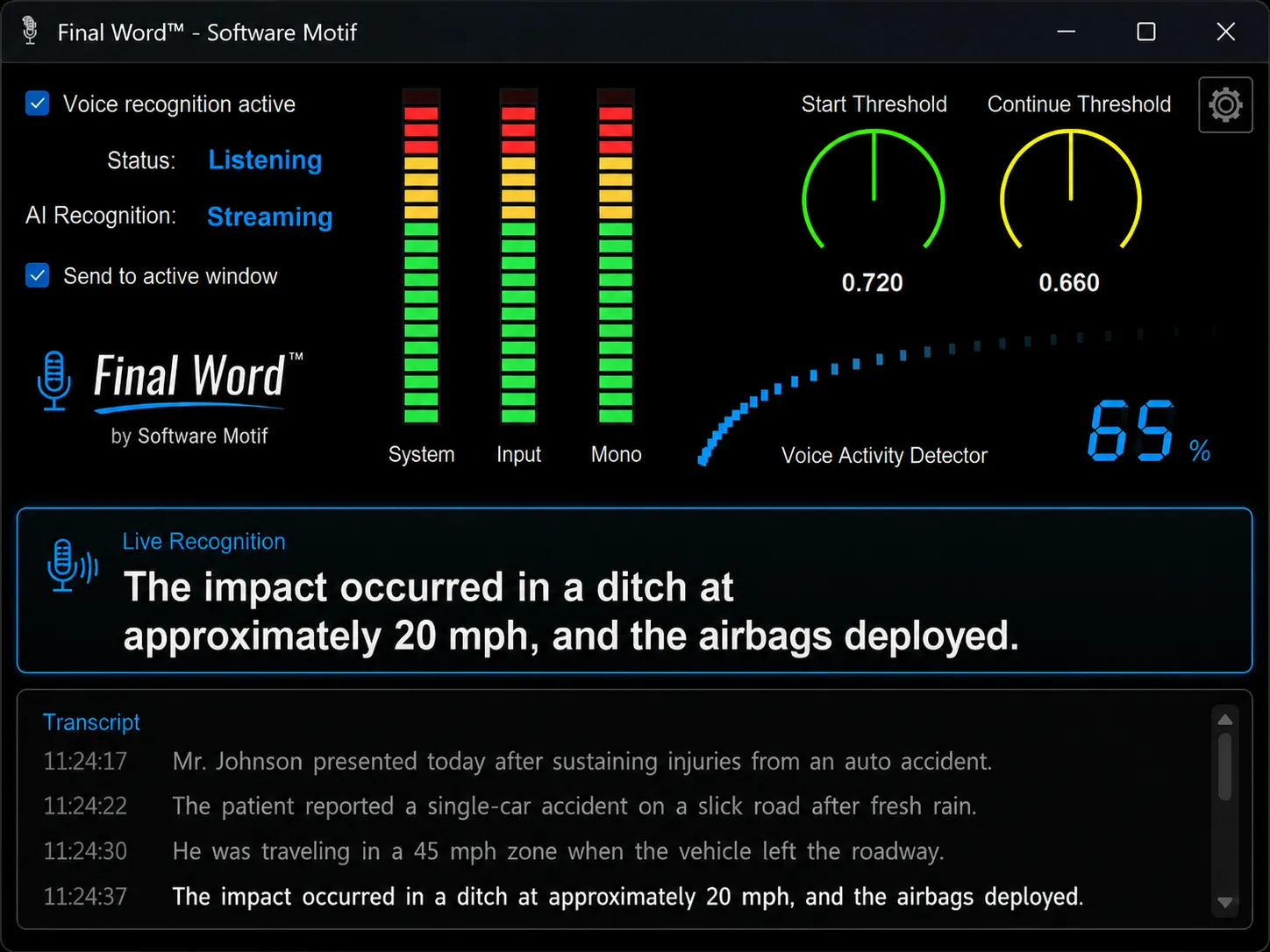
Voice recognition inside the MyEMR workflow
Final Word sends recognized speech directly into MyEMR at the active cursor.
Dictate accident histories, work injury descriptions, significant life events, and supplementary clinical comments while keeping the live recognition process visible. Final Word complements structured entry and random text precisely where free-form detail matters most, including the final additions to daily notes and narrative reports.
Voice activity detection recognizes when speech begins without constant button presses.
Follow listening, streaming, processing, and returned text in the focused dashboard.
Recognized text enters MyEMR wherever the active cursor is positioned.
From encounter to complete record
Focused clinical entry helps providers document the patient’s experience, examination findings, clinical conclusions, and care plan without forcing chiropractic care into a generic medical template. See what belongs in a chiropractic SOAP note template, where SOAP-note automation can help, and how to speed SOAP documentation without losing clinical detail.
Record complaint status, symptom behavior, functional change, and the patient’s response to care.
Document what you look at, touch, and test—from gait and palpation to orthopedic and neurological findings.
Connect current diagnoses, condition status, prognosis, and clinical interpretation.
Define treatment, frequency, goals, restrictions, referrals, and the next clinical step.
Precision without documentation overload
MyEMR starts with the doctor’s selected and entered facts.
Build a repeatable process to speed chiropractic charting while keeping those facts complete.
Random text creates natural variation. AI-assisted grooming improves organization and readability. Voice input captures exceptional detail. The result remains grounded in what the provider actually observed, concluded, and documented—an important principle in chiropractic compliance documentation.
Help the doctor’s exact findings become organized, readable, professional electronic medical records.
The MyEMR documentation philosophyOne Software Motif ecosystem
Share patient and appointment information across administrative, documentation, imaging, communication, and voice workflows to centralize clinic documentation securely. Compare chiropractic EMR vs. EHR, use this chiropractic EHR software review when evaluating systems, and consider how document imaging supports a paperless chiropractic office.
When planning hosted access, evaluate cloud EMR for chiropractors with a cloud clinic security checklist. Our guide to choosing chiropractic document-scanning software covers the supporting imaging workflow. See how a paperless chiropractic office connects scanned records, visit notes, and billing follow-up.
Made for chiropractic documentation
Focused windows prompt the findings that matter across routine visits, re-examinations, and injury cases.
Transform structured facts into readable notes that avoid the monotony of identical repeated phrasing. Compare the capabilities of chiropractic narrative-reporting software.
Review and edit the final record with a clear line back to the doctor’s own facts and judgment. Plan how completed records are kept with a chiropractic records retention policy.
From the Software Motif library
Use structured findings for the examination, random text for routine note creation, and complementary tools for authored or spoken detail. The 64-bit MyEMR release also includes P.A.R.T. entry palettes and a compact spinal-findings summary to help organize the examination record.
See MyEMR in your workflow
Talk with Software Motif about documentation built specifically for chiropractic practice.